How to Know If a Dehumidifier Is Working? 7 simple steps

- Published Date - November 02, 2026
- Modified date - November 02, 2026
Table of Contents
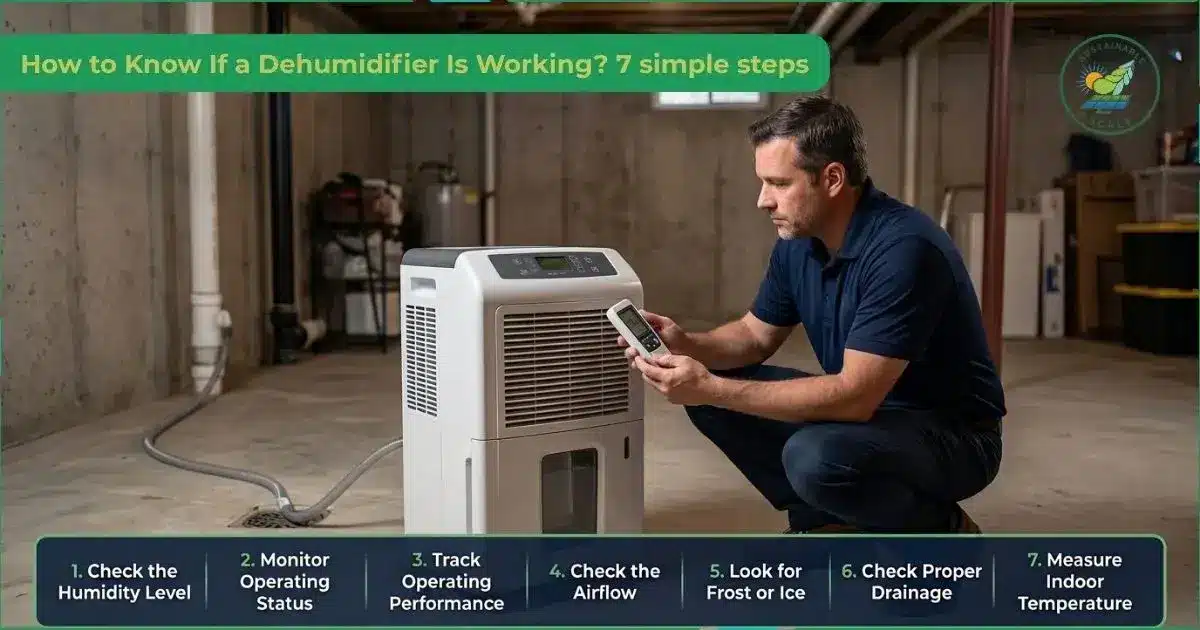
To know if a dehumidifier is working, check the level of humidity, monitor the operating status, track the operating status, check the airflow and measure the temperature in your home. Use a hygrometer to check humidity levels and compare readings with high humidity above 60%, low humidity below 30%, and an ideal range. Monitor the operating status and track it to confirm steady compressor cycles and consistent performance.
Check airflow at vents to ensure steady and unobstructed air movement. Evaluate coils for frost or ice, as it indicates airflow or temperature imbalance that reduces moisture removal. Water collection in the tank signals active moisture removal and proper internal function. Assess drainage to ensure water flows out without leaks or blockages. Check the temperature in your home to see how it relates to humidity and indoor comfort.
7 steps to know if a dehumidifier is working are given below.
- Check the level of humidity
- Monitor the operating status
- Track the operating status
- Check the airflow
- Look for frost or ice
- Ensure proper drainage
- Measure the temperature in your home
1. Check the level of humidity
Check the level of humidity using a hygrometer to measure the starting humidity before the dehumidifier turns on, which provides a clear baseline. Operate the dehumidifier for 1 to 2 hours in a closed room to pull excess moisture from the air. Assess whether the new hygrometer reading moves closer to the ideal level between high humidity (>60%) and low humidity (<30%), rather than staying above 60%.
Monitor humidity over a full day by taking several hygrometer readings at intervals, which reveals trends instead of a one time change. Stabilize humidity near the ideal level to avoid both mold prone high humidity (>60%) and nose drying low humidity (<30%).
2. Monitor the operating status
Monitor the operating status by verifying power and controls that confirm the plug connection, the outlet supply and the response of the power button. A dehumidifier then relies on the humidistat setting to keep the target level, which supports effective moisture removal and prevents the room from becoming overly damp. Check the outlet air temperature because warmer air indicates active heat exchange as moisture condenses on internal coils. Assess whether the fan operates freely and confirm unobstructed airflow across the evaporator and condenser surfaces.
Monitor the interface through checking indicator lights and the display for normal operating icons, warnings or error messages. Track whether the unit collects water in the tank over time, which confirms that condensed moisture leaves the air stream. Listen for normal sounds from the fan and compressor, which indicate steady operation instead of rattling or sudden silence.
3. Track the operating status
Track the operating status by first establishing a baseline to confirm a dehumidifier is effectively removing moisture from the room. Log humidity versus time with a hygrometer at regular intervals so the trend of moisture reduction becomes clear. Verify the collection of water in the tank and compare the amount with the logged humidity drop to confirm efficiency. Check that the filter is clean so airflow remains strong and air circulates properly through the coils instead of being blocked by dust.
Watch for stable control in the humidity curve of the dehumidifier to confirm the unit holds levels steady rather than allowing swings that risk structural damage. Monitor output through vent airflow, temperature and consistent operation noises. Use these indicators to confirm the dehumidifier prevents mold growth while removing excess moisture.
4. Check the airflow
Check that the dehumidifier has a consistent stream of air moving through the system so it can remove moisture and help prevent mold growth. Place your hand at the outlet and feel for airflow, noting its strength and temperature. Use a light object like a tissue or a strip of paper in front of the vent to see how steadily the air moves. Hold your hand or a light object near the intake grille to check the airflow, which helps you confirm if air is being drawn in properly.
Inspect and clean the dehumidifier air filter so air can move freely through the unit. Look for and remove any obstructions around the dehumidifier to secure healthy indoor air quality. Retest the airflow after cleaning the filter and clearing space around the unit to help protect structural materials from rotting and reduce condensation.
5. Look for frost or ice
Look for frost or ice on the dehumidifier to confirm that the cooling system operates correctly and to catch performance issues that reduce moisture removal. Turn off and unplug the unit before inspection to avoid electrical hazards and contact with moving parts. Open the front or side panel to access the evaporator coils so the metal surfaces and fins appear clearly. Check the coils and refrigerant lines for ice buildup. Observe the pattern, which helps identify airflow restrictions or low ambient temperatures pushing the system outside its normal range.
Evaluate continuous ice buildup on the dehumidifier as a sign of a malfunctioning auto defrost feature or a deeper refrigeration fault. Unplug the dehumidifier and let all the frost melt until the coils return to bare metal, which fully defrosts the unit. Check room conditions and monitor the unit after defrosting to verify that frost does not return quickly.
6. Ensure proper drainage
Ensure the dehumidifier has proper drainage so moisture removal translates into safe water handling that avoids leaks and prevents water damage around the unit. Check the collection tank for cracks, dirt or misalignment and confirm the tank is properly seated so internal switches detect its position correctly instead of shutting down due to a full bucket. Verify that the tank outlet and internal channel stay clear, preventing water backflow. Inspect the continuous drain setup to confirm the hose route slopes downward and avoids kinks.
Connect the dehumidifier’s continuous drainage setup to the designated port using a standard garden hose. Attach a standard hose and switch between tank and drain modes to test water flow, which confirms it collects in the tank or drains through the hose as selected. Keep the drain path open by not replacing the drain cap when continuous drainage operates and maintain secure hose placement so the system avoids leaks.
7. Measure the temperature in your home
Measure the temperature in your home to relate the dehumidifier’s moisture removal to thermal comfort and maintain an ideal indoor environment. Measure the ambient temperature in key rooms using a digital indoor thermometer, hygrometer or a smart home sensor, which allows several minutes for readings to stabilize. Evaluate the ambient temperature against the dehumidifier operating range in the manual to confirm conditions support efficient dehumidification. Assess performance based on temperature by noting that low readings slow drying while high readings increase demand, both affecting risks of structural damage and health issues.
Evaluate the dehumidifier temperature readings to optimize placement and operation so airflow and cycling patterns align with room conditions. Check the display on the dehumidifier to assess any shown temperature, humidity or status against your digital indoor thermometer, hygrometer or smart home sensor. Use these assessments over time to refine dehumidifier settings so the system maintains an ideal indoor environment.
What are the signs that a dehumidifier is working properly?
The signs to check that a dehumidifier is working properly include proper water collection, airflow strength, warm exhaust air, compressor cycling and operating signals. The dehumidifier removes moisture from the air, collects water and runs without interruption. It runs with stable airflow, sound and signals.
The signs to check if the dehumidifier is working properly are given below.
- Proper water collection: Dehumidifiers consistently collect water in the tank or through the drain line that matches the room’s humidity and runtime without long dry periods during damp conditions.
- Airflow strength: Dehumidifiers deliver steady airflow from the outlet, which shows that the fan moves air across the coils without weak spots, dead zones or frequent stops.
- Warm exhaust air: Dehumidifiers discharge warm air at the outlet, which indicates active refrigeration and heat exchange as moisture condenses on internal coils.
- Compressor cycling: Dehumidifiers cycle the compressor on and off at reasonable intervals instead of running nonstop or turning off too quickly.
- Operating signals: Dehumidifiers display normal indicator lights and status messages without recurring error codes, full bucket warnings or alarm tones.
- No frost buildup: Dehumidifiers keep coils free of persistent frost or ice, which shows balanced airflow and temperature control during operation.
- Temperature and humidity shift: Dehumidifiers lower surrounding humidity levels and stabilize room temperature within the comfort range.
- Rattling during operation: Dehumidifiers operate without rattling during operation, grinding or unusual vibrations, which signals that internal components remain secure and aligned.
What are the common causes of dehumidifier problems?
The common causes of dehumidifier problems include dirty or clogged components, environmental factors, settings and controls, mechanical issues and power and electrical issues. These faults reduce moisture removal, cause noises or shutdowns and trigger warning lights or error codes that signal a malfunction. The dehumidifier suffers damage to parts and has a shorter service life.
The common causes of dehumidifier problems are given below.
- Dirty or clogged components: Dehumidifiers face problems when clogged air filters and dust on coils restrict airflow, reduce efficiency and lead to frozen coils that disrupt moisture removal.
- Environmental factors: Dehumidifiers encounter problems when environmental factors such as poor placement, blocked vents or extreme temperature and humidity conditions push the unit beyond its effective operating range.
- Settings and controls: Dehumidifiers face problems when incorrect settings on humidistats, fan speeds or operating modes prevent the unit from achieving or maintaining the desired humidity level.
- Mechanical issues: Dehumidifiers develop problems when mechanical components like fans, compressors or sensors wear out or fail, which leads to unusual noise, poor airflow or improper condensate collection.
- Power and electrical issues: Dehumidifiers exhibit problems when power and electrical issues such as loose plugs, tripped breakers or faulty wiring, interrupt normal operation or prevent the unit from starting.
- Water collection and drainage issues: Dehumidifiers suffer problems when water collection and drainage systems fail due to full or misaligned buckets or clogged and kinked hoses that cause leaks or stop proper drainage.
- Lack of regular maintenance: Dehumidifiers show problems when regular maintenance is neglected, as lack of cleaning, infrequent inspections and ignored warning signs reduce performance and reliability.
How to fix a dehumidifier?
Fix a dehumidifier by first turning it off, unplugging it and checking the basics before moving to internal maintenance. Start by replacing the air filter if it is clogged or worn, since a dirty filter restricts airflow and reduces efficiency. Clean reusable filters gently with water and mild detergent, then let them dry completely before reinstalling. Carry out cleaning the coils by removing dust and grime with a soft brush or vacuum because dirty coils make the unit work harder and lower the moisture removal performance.
Check the water bucket by emptying it whenever the full indicator comes on and inspecting the tank and float for leaks or blockages. Ensure it runs straight and downhill without kinks that could cause leaking or poor drainage if the unit is connected to a drain hose. Verify that the humidistat is set to a suitable humidity level for the room and look for weak airflow or louder than normal noises. This can signal a blocked fan, a failing fan motor or a refrigerant issue that may require professional service.
Does a dehumidifier have a reset button?
Yes, a dehumidifier has a reset button in some models, but not all units include a dedicated switch on the control panel. It may use a power button reset, a reset button on the plug or a filter reset to restore normal operation and clear alerts.
Why does a dehumidifier blow hot air?
A dehumidifier blows hot air because its refrigeration cycle removes moisture while releasing heat from the condenser coil as a normal byproduct of operation. It produces warmer air when dirty filters or clogged coils restrict airflow and cause internal heat buildup. It can also output unusually warm air if poor ventilation or compressor issues reduce cooling efficiency. A dehumidifier may enter defrost mode in cold environments, during which it temporarily produces warmer air to melt ice on the coils.
How to make dehumidifiers work efficiently?
To make a dehumidifier work efficiently, place it in a central location to remove moisture across the space. Maintain environmental control with closed windows and doors. Support balanced comfort through the correct humidity setting. Improve reliability through cleaning components, inspecting parts and maintaining stable, grounded electrical connections.
How to increase the lifespan of dehumidifiers?
To increase the lifespan of a dehumidifier, clean or replace the air filter every few weeks, clean the coils and sanitize the water tank monthly to prevent mold. Its drainage system and vents should stay clear and protected. It performs better in proper placement, avoids overuse and electrical stress, and benefits from routine checks and seasonal storage.
Products
Solar Panel
Air Purifier